Introduction
Spotify has become one of the most important music streaming platforms in the world. However, publishing music on Spotify is only part of the process.
To manage your presence on the platform, there is Spotify for Artists, a free tool that allows artists and record labels to manage their profiles, access analytics, and promote their releases.
If you are an independent artist, manager, or record label, claiming your profile is one of the first steps toward gaining control over your catalog and understanding your audience better.
Table of Contents
- What is Spotify for Artists?
- How does it work?
- What is it used for?
- Main features
- How to claim your profile step by step
- Who can claim a profile?
- Advantages and disadvantages
- Common mistakes
- Real-world examples
- Frequently Asked Questions
- Final summary
What Is Spotify for Artists?
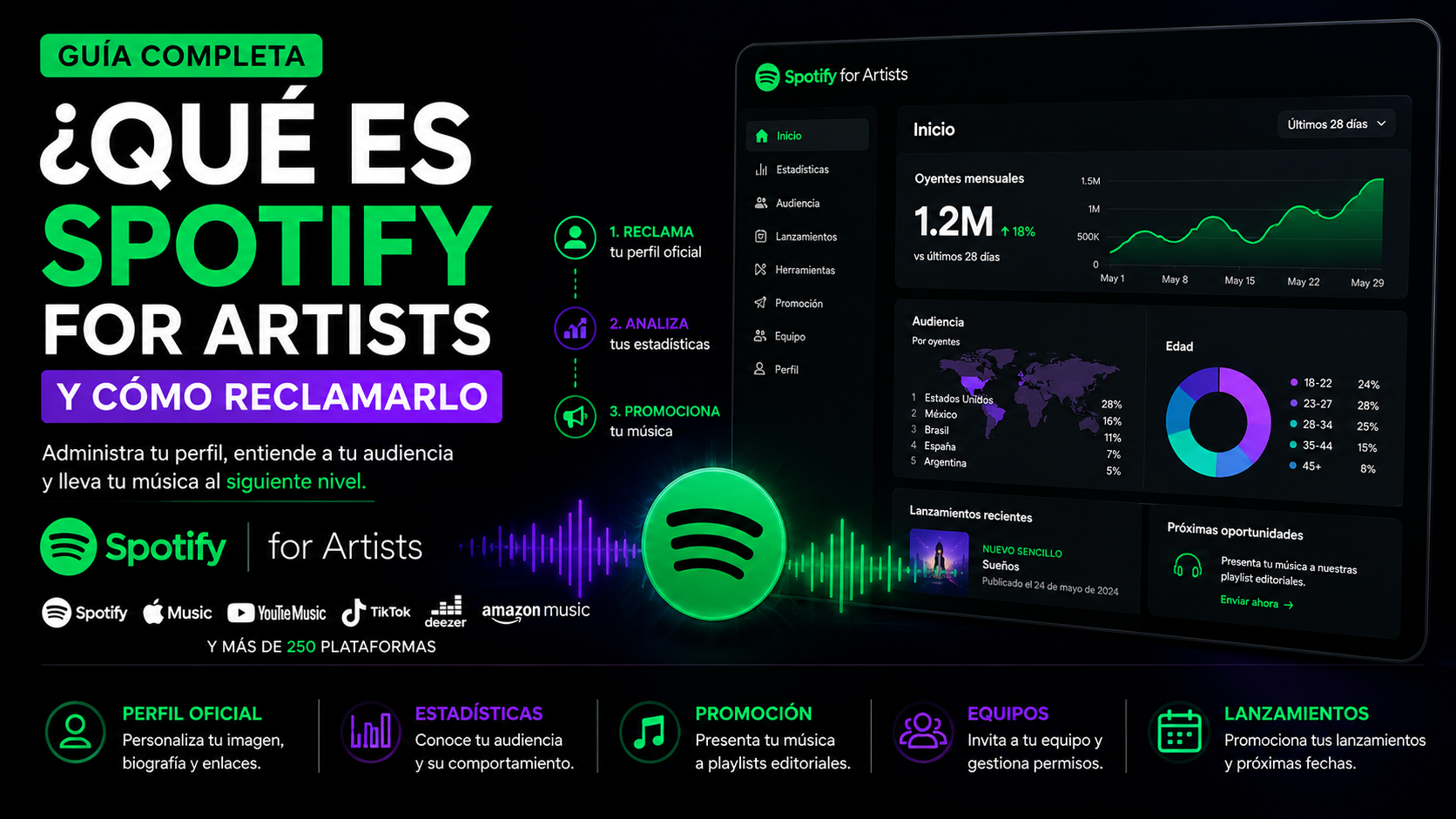
Spotify for Artists is the official platform that allows artists and their teams to manage their presence on Spotify.
Through this tool, you can:
- Manage your artist profile.
- Access analytics and statistics.
- Update photos and biography.
- View audience demographics.
- Pitch unreleased songs to editorial playlists.
- Manage teams and permissions.
It is a free tool available to artists, managers, and record labels.
What Can You Do with Spotify for Artists?
Spotify for Artists allows you to:
- Customize your profile.
- View real-time streams.
- Analyze countries and cities where your music is played.
- Understand your audience's age and gender.
- Promote releases.
- Share access with managers and collaborators.
- Submit songs to editorial playlists.
How Does Spotify for Artists Work?
When a song is distributed to Spotify through a music distributor, an artist page is automatically created.
However, the artist does not immediately gain access to manage the profile.
To gain control, you need to:
- Have music available on Spotify.
- Access Spotify for Artists.
- Verify your identity.
- Request access to your profile.
- Wait for approval.
Once approved, you can manage all available features.
What Is Spotify for Artists Used For?
1. Managing Your Profile
You can update:
- Profile picture.
- Header image.
- Biography.
- Social media links.
- Merchandise.
- Concert dates.
2. Analyzing Your Audience
Spotify provides information about:
- Monthly listeners.
- Followers.
- Streams.
- Countries and cities.
- Age and gender.
- Traffic sources.
These insights help artists understand how their careers are growing.
3. Pitching Songs to Editorial Playlists
Artists can submit unreleased songs to Spotify's editorial team.
This increases the chances of appearing on:
- Official playlists.
- Algorithmic playlists.
- Personalized recommendations.
It does not guarantee placement, but it allows the editorial team to evaluate your music.
4. Managing Teams
Spotify for Artists allows you to grant permissions to:
- Managers.
- Record labels.
- Agencies.
- Marketing teams.
- Collaborators.
Each user can have different levels of access.
Main Features
| Feature | Description |
|---|---|
| Artist Profile | Edit images and biography |
| Analytics | View streams and audience data |
| Editorial Playlists | Pitch unreleased songs |
| Teams | Manage permissions |
| Merchandise | Showcase official products |
| Concerts | Promote events |
How to Claim Spotify for Artists Step by Step
Step 1
Distribute your music.
Your music must be available on Spotify.
Step 2
Go to Spotify for Artists.
Select:
"Get Access"
Step 3
Search for your artist name.
Select the correct profile.
Step 4
Verify your identity.
Spotify may request:
- A Spotify account.
- Social media profiles.
- Website.
- Email address.
- Release information.
Step 5
Wait for approval.
In many cases, approval takes only a few hours, although it can sometimes take several days.
Process Diagram
Create your music
        ↓
Distribute to Spotify
        ↓
Your artist profile is created
        ↓
Request access
        ↓
Spotify verifies your identity
        ↓
Get Spotify for Artists access
Who Can Claim a Profile?
The following users can request access:
| User | Can Claim? |
|---|---|
| Independent Artist | Yes |
| Record Label | Yes |
| Manager | Yes |
| Agency | Yes |
| Marketing Team | Yes |
| Fans | No |
Advantages and Disadvantages
| Advantages | Disadvantages |
|---|---|
| Free to use | Requires published music |
| Access to analytics | Some metrics may be delayed |
| Allows profile editing | Does not guarantee playlist placement |
| Facilitates teamwork | Some features vary by country |
| Improves audience understanding | Requires verification |
Real-World Examples
Case 1: Independent Artist
An artist releases their first single.
By claiming Spotify for Artists, they can:
- Customize their profile.
- View analytics.
- Pitch new songs to playlists.
- Discover where their audience is located.
Case 2: Record Label
A label manages 30 artists.
Spotify for Artists allows them to:
- Manage multiple profiles.
- Share access.
- Analyze statistics.
- Coordinate campaigns.
Case 3: Manager
A manager can access an artist's profile to:
- Review metrics.
- Update biographies.
- Analyze growth.
- Prepare promotional strategies.
Common Mistakes
1. Trying to Claim the Profile Before Distributing Music
Spotify requires an artist page to exist.
Without published music, it is not possible to claim a profile.
2. Using Inconsistent Information
Differences between:
- Social media profiles.
- Distributor information.
- Artist name.
- Website.
May delay verification.
3. Thinking Spotify for Artists Automatically Increases Streams
The platform provides tools and analytics.
Growth depends on:
- Music quality.
- Promotional strategy.
- Release frequency.
- Relationship with the audience.
Spotify for Artists vs Spotify
| Feature | Spotify | Spotify for Artists |
|---|---|---|
| Listen to music | Yes | No |
| Edit profile | No | Yes |
| View analytics | Limited | Yes |
| Pitch songs | No | Yes |
| Manage teams | No | Yes |
Frequently Asked Questions (FAQ)
Is Spotify for Artists free?
Yes.
Spotify offers the platform at no cost.
Do I Need a Distributor to Use Spotify for Artists?
Yes.
You must first have music published on Spotify.
How Long Does Verification Take?
It can take anywhere from a few hours to several days.
Can I Claim a Profile Before My Release Is Live?
In some cases, yes.
If the distributor has already delivered the music and Spotify has created the artist profile, you may request access before the release date.
Is Spotify for Artists Useful for Record Labels?
Yes.
Labels can manage multiple artists.
Can I Add Team Members?
Yes.
Spotify allows you to assign different permission levels.
Can I Change My Artist Photo?
Yes.
The profile image and biography can be edited directly from the platform.
Does Spotify for Artists Guarantee Playlist Placement?
No.
It allows artists to pitch songs, but playlist selection depends on Spotify's editorial team and algorithms.
What Analytics Does It Offer?
It provides data on streams, listeners, followers, geographic locations, and demographics.
Can I Manage Multiple Artists?
Yes.
Managers and labels can have access to multiple artist profiles.
Final Summary
Spotify for Artists is the official tool that allows artists and record labels to manage their presence on Spotify.
It provides access to analytics, profile customization, team management, and the ability to pitch songs to editorial playlists.
Claiming your profile is an important step for any artist who wants to better understand their audience and manage their music career with greater control.
Today, many music distributors and artist management platforms, such as UXEM Entertainment Group and other companies in the industry, provide tools that simplify access to and management of profiles across streaming services like Spotify.