What Is a Topic Channel and How Does It Work?
Introduction
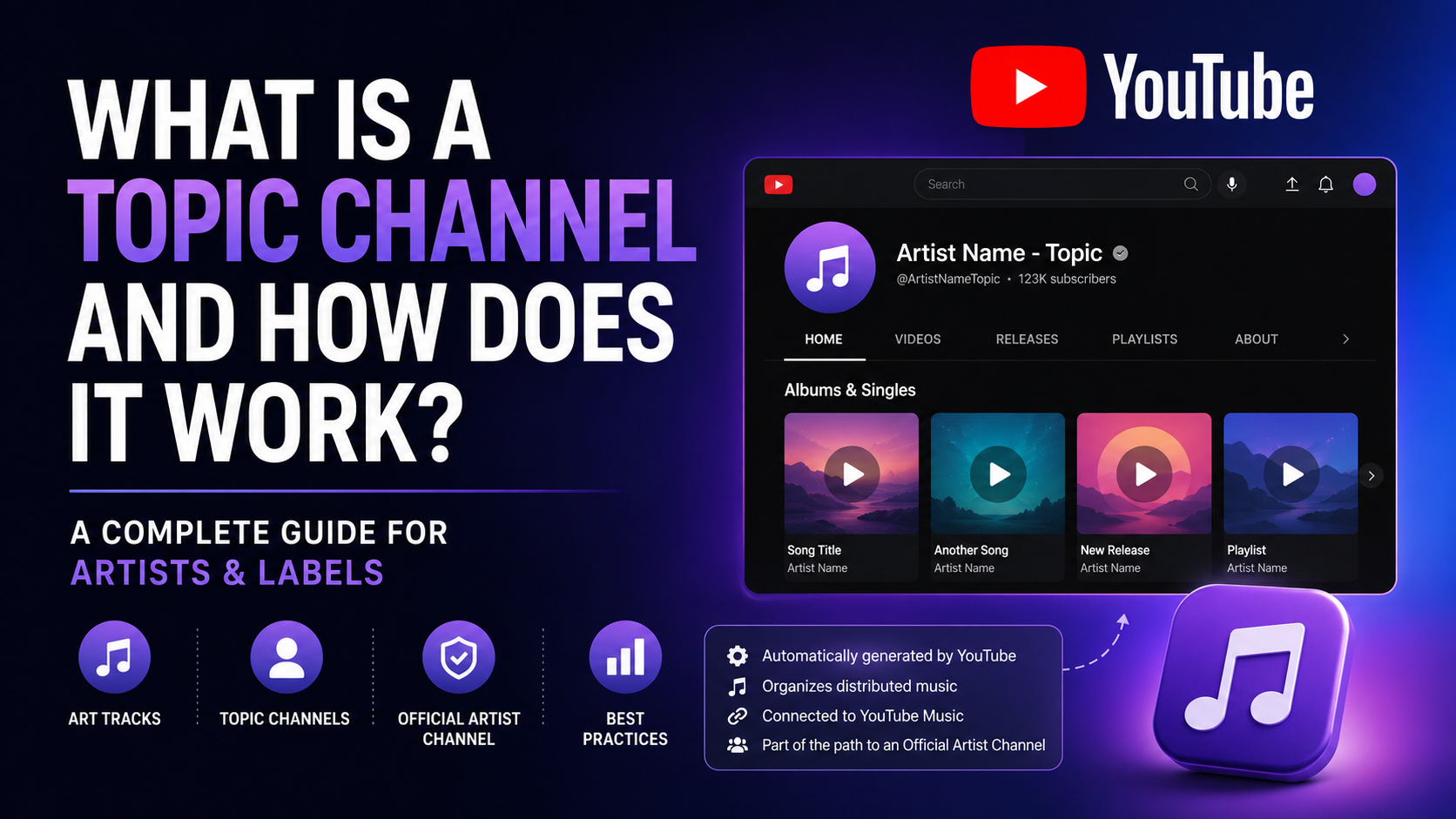
A Topic Channel, also known as an “Artist - Topic” channel, is a channel automatically generated by YouTube to organize music officially distributed to YouTube Music and YouTube.
For many independent artists, managers, and record labels, this type of channel can be confusing because it may appear on YouTube without the artist manually creating it. However, in most cases, it is not an error: it is part of YouTube’s music delivery system.
Understanding how a Topic Channel works is important to avoid artist identity issues, incorrectly assigned content, duplicated releases, or confusion when requesting an Official Artist Channel.
Table of Contents
- What is a Topic Channel?
- How does a Topic Channel work?
- What is an Art Track?
- Who creates a Topic Channel?
- Differences between a Topic Channel, a personal channel, and an Official Artist Channel
- Why does my music appear on a Topic Channel?
- Can a Topic Channel be managed?
- Common mistakes
- Real-world cases
- Advantages and disadvantages
- Best practices for artists and labels
- Frequently asked questions
- Conclusion
What is a Topic Channel?
A Topic Channel is a channel automatically created by YouTube to group music associated with an artist, album, song, or music catalog.
It usually appears with names such as:
Artist Name - TopicAlbum Name - TopicVarious Artists - TopicSong Title - Topic
These channels are not created from YouTube Studio like a regular channel. They are generated from music delivered to YouTube through distributors, labels, aggregators, or authorized delivery systems.
In simple terms: a Topic Channel is an automatic showcase where YouTube organizes officially distributed songs.
How does a Topic Channel work?
When a song is distributed to YouTube Music, YouTube may create an automatic audio version on YouTube. That version is usually called an Art Track.
The system uses release information such as:
- Artist name.
- Song title.
- Album or single title.
- Cover artwork.
- ISRC.
- UPC.
- Record label.
- Metadata sent by the distributor.
- Official audio file.
With this information, YouTube can organize the music inside a Topic Channel.
Basic flow
| Step | What happens |
|---|---|
| 1 | The artist or label delivers the music to a distributor |
| 2 | The distributor sends the release to YouTube Music |
| 3 | YouTube receives the audio, cover artwork, and metadata |
| 4 | YouTube automatically generates Art Tracks |
| 5 | The Art Tracks are grouped into a Topic Channel |
| 6 | If the artist meets the requirements, they may request an Official Artist Channel |
What is an Art Track?
An Art Track is an automatically generated YouTube video that combines:
- The official audio of the song.
- The release cover artwork.
- The main metadata of the recording.
It is not a filmed music video, a lyric video, or a video manually uploaded by the artist. It is an automatic representation of the song within the YouTube ecosystem.
Example:
An artist distributes a song called “Blue Moon”. YouTube may create an automatic video with the single cover and official audio. That video could appear on a channel called:
Artist Name - Topic
Who creates a Topic Channel?
The Topic Channel is created automatically by YouTube when it receives music through official delivery channels.
The process usually involves:
- The artist.
- The record label.
- The music distributor.
- YouTube Music.
- YouTube’s metadata system.
The artist usually does not have a button to manually create a Topic Channel. They also cannot edit it as if it were a regular channel.
Differences between a Topic Channel, a personal channel, and an Official Artist Channel
| Channel type | Who creates it | What it contains | Can it be managed from YouTube Studio? |
|---|---|---|---|
| Topic Channel | YouTube automatically | Art Tracks and distributed music | Not directly |
| Artist’s own channel | The artist or their team | Music videos, Shorts, visual content, community posts | Yes |
| Official Artist Channel | YouTube, after request and eligibility review | Official music, videos, Art Tracks, and artist content in one place | Yes, from the main channel |
Why does my music appear on a Topic Channel?
Your music may appear on a Topic Channel because it was delivered to YouTube Music through an authorized music distributor or label.
This can happen even if you already have your own YouTube channel.
Example:
An artist has a channel called:
@JamesRiverOfficial
But after distributing music, YouTube automatically creates:
James River - Topic
This does not mean someone stole the song. In many cases, it simply means YouTube created an automatic space to organize officially delivered music.
Is a Topic Channel the same as YouTube Music?
Not exactly.
YouTube Music is YouTube’s music streaming platform. A Topic Channel is one way some of that music is also organized within YouTube.
Distributed music may be available on:
- YouTube Music.
- YouTube.
- Art Tracks.
- Topic Channels.
- Search results.
- Algorithmic recommendations.
Can a Topic Channel be managed?
In general, a Topic Channel is not managed like a traditional channel.
Usually, you cannot:
- Change the profile image directly.
- Publish Shorts manually.
- Edit the channel description.
- Reply to comments from that channel.
- Customize channel sections.
- Upload videos manually.
To have editorial and visual control, the artist should work with their own channel and, if eligible, request an Official Artist Channel.
What is an Official Artist Channel?
An Official Artist Channel, also known as an OAC, is a verified channel that brings together an artist’s music presence on YouTube.
It may integrate:
- The artist’s own channel.
- Art Tracks.
- Distributed music.
- Official videos.
- YouTube Music content.
- Related subscribers.
The goal is to help fans find the artist’s official music and content in one place.
Topic Channel vs Official Artist Channel
| Feature | Topic Channel | Official Artist Channel |
|---|---|---|
| Creation | Automatic | By request and approval |
| Artist control | Limited | Greater control |
| Content | Mainly Art Tracks | Art Tracks, videos, Shorts, and official content |
| Customization | Very limited | Yes |
| Music badge | Not always | Yes, when applicable |
| Best for | Automatic music organization | Consolidated official artist presence |
Why can an artist have several Topic Channels?
An artist may end up with several Topic Channels because of metadata errors or name variations.
Common causes include:
- Artist name written in different ways.
- Accents omitted or added.
- Collaborations incorrectly tagged.
- Incorrect use of “feat.”, “ft.”, or “with”.
- Releases delivered by different aggregators.
- Duplicated or poorly managed ISRCs.
- Different artists with the same name.
- Artist name changes without a clear strategy.
Example:
The same artist could appear as:
John Smith - TopicJohn Smyth - TopicJ. Smith - TopicJohn Smith Official - Topic
This can fragment the catalog and confuse listeners.
Common mistakes with Topic Channels
1. Thinking the Topic Channel was created by someone else
That is not always the case. Many times, the channel was automatically generated by YouTube from an official delivery.
2. Using inconsistent artist names
Changing small parts of the artist name can split the catalog.
3. Distributing music with incomplete metadata
Metadata is the invisible skeleton of a release. If it is wrong, the system may organize the music incorrectly.
4. Confusing a Topic Channel with an official channel
A Topic Channel does not replace the artist’s own channel.
5. Requesting an Official Artist Channel before organizing the catalog
Before requesting an OAC, it is useful to review whether the music is correctly assigned.
6. Not reporting songs assigned to another artist
When a song appears on another artist’s Topic Channel, a correction should be requested through the distributor or corresponding partner.
Real-world cases
Case 1: new artist without a previous Topic Channel
An artist releases their first song. YouTube may first create an automatic channel associated with the release or artist. Over time, if more songs are released, the system may group them under the artist’s Topic Channel.
Case 2: two artists with the same name
Two artists with the same name may incorrectly share the same Topic Channel. This usually requires a metadata review and a profile separation request.
Case 3: catalog split across several channels
An artist who released music through different distributors may see their songs separated across several Topic Channels. In these cases, each UPC, ISRC, artist name, and delivery provider should be reviewed.
Case 4: correct song, wrong profile
The song was delivered correctly, but YouTube associated it with another artist with a similar name. The distributor should report the issue so the content can be reassigned.
Advantages of a Topic Channel
| Advantage | Explanation |
|---|---|
| Automation | YouTube organizes the music without the artist manually uploading each song |
| Presence on YouTube | Music can appear in search results, recommendations, and playlists |
| Connection with YouTube Music | It helps connect the distributed catalog with YouTube’s music ecosystem |
| Scalability | It works for artists, labels, and large catalogs |
| Foundation for an OAC | It may be part of the path toward an Official Artist Channel |
Disadvantages or limitations
| Limitation | Explanation |
|---|---|
| Limited visual control | It cannot be customized like a regular channel |
| Metadata dependence | Information errors can affect assignment |
| Fan confusion | Some listeners do not understand the difference between a personal channel and a Topic Channel |
| Corrections are not immediate | Changes may take time and depend on review |
| Risk of artist mixing | This can happen when artists have similar names |
Best practices for artists and labels
Keep the artist name consistent
Always use the same name across all releases. Avoid unnecessary variations.
Review metadata before distribution
Before approving a release, check:
- Artist name.
- Collaborators.
- Titles.
- ISRC.
- UPC.
- Label.
- Language.
- Genre.
- Cover artwork.
- Credits.
Use primary artists and collaborators correctly
A primary artist is not the same as a featured collaborator. This difference can affect how YouTube organizes the content.
Monitor every release after publication
After the release date, review:
- YouTube Music.
- YouTube.
- Topic Channel.
- Art Tracks.
- Credits.
- Artist profile.
- Search results.
Report errors with evidence
If there is an issue, collect:
- Link to the affected song.
- Link to the incorrect Topic Channel.
- Link to the correct channel, if available.
- UPC.
- ISRC.
- Exact artist name.
- Screenshots.
- Clear explanation of the error.
What should I do if my song appears on the wrong Topic Channel?
The recommended step is to contact the distributor or label that delivered the release.
The request should explain:
- Which song is affected.
- Which channel it currently appears on.
- Which artist it actually belongs to.
- Whether a correct channel exists.
- Whether a Topic Channel needs to be created or separated.
- Which links and codes identify the release.
Example situation:
A song by an independent artist called Alex Carter appears on the Topic Channel of another artist with the same name. In that case, the distributor may request that YouTube separate the content and associate it with the correct profile.
What is the relationship between a Topic Channel and YouTube Content ID?
Topic Channel and YouTube Content ID are not the same thing.
| Concept | Main function |
|---|---|
| Topic Channel | Organizes officially distributed music on YouTube |
| Art Track | Automatic video with audio and cover artwork |
| YouTube Music | Music streaming platform |
| Content ID | System for identifying and monetizing uses of protected content |
A song can appear on a Topic Channel and also be protected by Content ID, but they are different processes.
What options does an artist have?
An artist can have several layers of presence on YouTube:
| Option | Recommended use |
|---|---|
| Topic Channel | Automatically distributed music |
| Personal channel | Branding, videos, Shorts, community, and communication |
| Official Artist Channel | Consolidating official music and content |
| YouTube Content ID | Protecting and monetizing uses of recordings |
| YouTube Music | Music consumption within the streaming platform |
The ideal strategy is not to choose only one, but to understand how they complement each other.
Recommendations before requesting an Official Artist Channel
Before requesting an OAC, review:
- Whether the artist has an active personal channel.
- Whether the artist name is consistent.
- Whether the Art Tracks are correctly assigned.
- Whether there are unnecessary duplicate Topic Channels.
- Whether releases are mixed with artists who have the same name.
- Whether the personal channel truly represents the artist.
- Whether the distributor can manage the request or indicate the correct process.
FAQ: Frequently Asked Questions About Topic Channels
1. What is a Topic Channel?
It is a channel automatically created by YouTube to group officially distributed music from an artist, album, or catalog.
2. Can I manually create a Topic Channel?
Usually, no. YouTube generates it automatically when it receives music through distributors or authorized partners.
3. Is a Topic Channel bad?
No. It is a normal part of YouTube’s music ecosystem.
4. Can I edit my Topic Channel?
In general, it cannot be edited like a regular channel from YouTube Studio.
5. Why does my song appear on another Topic Channel?
It may be due to artists with similar names, incorrect metadata, or a mistaken automatic assignment.
6. What should I do if my music is on the wrong Topic Channel?
You should contact your distributor or label and send links, UPC, ISRC, and a clear explanation of the issue.
7. Does a Topic Channel monetize?
Monetization depends on the delivery, rights, YouTube policies, distributor agreements, and catalog configuration.
8. Are a Topic Channel and an Official Artist Channel the same?
No. A Topic Channel is automatic and limited; an Official Artist Channel consolidates the artist’s official presence.
9. Does my Topic Channel disappear if I get an Official Artist Channel?
It may continue to exist, but Art Tracks can be displayed as part of the Official Artist Channel experience.
10. What is an Art Track?
It is an automatic video created by YouTube with the official audio of a song and the release cover artwork.
11. Can I change the cover artwork of an Art Track?
Usually, it is updated by correcting the release artwork through the distributor, not by manually editing the video.
12. Why do I have several Topic Channels?
This can happen due to name variations, metadata errors, releases through different distributors, or artists with the same name.
13. Do I need a Topic Channel to be on YouTube Music?
You do not request it directly. It appears as part of the process when your music is officially delivered.
14. Does a Topic Channel replace my YouTube channel?
No. Your own channel remains important for music videos, Shorts, community, communication, and artist branding.
15. Who corrects errors on a Topic Channel?
Usually, the distributor, label, or partner that delivered the content must escalate the correction to YouTube.
Conclusion
A Topic Channel is an automatic music organization tool within the YouTube ecosystem. It should not be seen as an enemy of the artist, but as a technical piece that helps display officially distributed music.
Problems appear when metadata is incorrect, the artist name is inconsistent, or YouTube assigns songs to the wrong profile. For that reason, artists, managers, and labels should carefully review every release and act quickly when they detect errors.
For a professional strategy, the Topic Channel should be understood alongside the artist’s own channel, YouTube Music, Art Tracks, the Official Artist Channel, and, when applicable, YouTube Content ID.
In the case of distributors such as UXEM Entertainment Group, this type of review is part of the operational work needed to ensure that music from artists and labels reaches digital platforms correctly and maintains a clear identity within the global music ecosystem.